via How-to-Geek
Monday, April 30, 2012
Friday, April 27, 2012
How Do I Get eBooks & Other Documents to My Kindle?
While the Amazon eBook store is wonderful, you might find deals elsewhere or download free eBooks or just have some other documents you would like to read on your Kindle. If you don't own a Kindle, but have an iPad/iPhone/iPod Touch, you can also use the Kindle app to read them as well.
If this sounds like something you would be interested in, check out all the details at How-To Geek.
Thursday, April 26, 2012
Looking for an All-in-One Mobile Device Management Solution?
In many businesses these days, it is becoming increasingly common for the every day worker to request access to their email and other company resources on their personal smartphone. In order to secure your company's data if (and when) those phones turn up missing or stolen, you need to have a good mobile device management solution. I know there are a few of these out there....Good Technologies , Odyssey Software and a number of others. Even Microsoft Exchange 2010 SP1 can do a little more than rudimentary management these days.
Well Research in Motion (RIM) jumped into the fray with their BlackBerry Mobile Fusion suite. We all know that BES + BlackBerry smartphones & devices make your date quite secure, but it is highly unlikely these days that all the phones in your company are BlackBerries. While Mobile Fusion does not replace BES for actual BlackBerry devices, it can be used in conjunction. But what's more important is that Mobile Fusion supports Android phones & tablets as well as Apple's iPhones & iPads.
While I've not used this MDM, it does look worth testing out, and the 60 day trial with a few client licenses included is just what any business would want. And what would pricing be after the trial if you would decide to begin using Mobile Fusion? RIM's initial press release information did not specify pricing, but this article from CNET says that Client Access Licenses will start at $99 per user or $4 per user per month and will allow for volume discounts.
Well Research in Motion (RIM) jumped into the fray with their BlackBerry Mobile Fusion suite. We all know that BES + BlackBerry smartphones & devices make your date quite secure, but it is highly unlikely these days that all the phones in your company are BlackBerries. While Mobile Fusion does not replace BES for actual BlackBerry devices, it can be used in conjunction. But what's more important is that Mobile Fusion supports Android phones & tablets as well as Apple's iPhones & iPads.
While I've not used this MDM, it does look worth testing out, and the 60 day trial with a few client licenses included is just what any business would want. And what would pricing be after the trial if you would decide to begin using Mobile Fusion? RIM's initial press release information did not specify pricing, but this article from CNET says that Client Access Licenses will start at $99 per user or $4 per user per month and will allow for volume discounts.
Wednesday, April 25, 2012
Windows Malware - Ransomware: Pay me to boot your computer.
Trend Micro has released some information on a new group of bookit malware that is part of a hybrid attack on users computers. The infection vector could be any an unpatched Windows, Flash, Java, Acrobat or other vulnerability. Once infected, the malware will download multiple different types of malware (such as a Fake Antivirus program) including the ransomware. Once executed, the ransom malware will infect the Master Boot Record (MBR) of the system Hard Drive. While this is not unusual these days (the TDSS/Aleuron family uses this technique), this new malware will display a message on boot (most likely non-English) asking for money to get an encryption key to allow the computer to continue to boot into Windows.
This type of infection (MBR) is highly difficult to resolve remotely, and usually requires "offline" manual cleanup utilizing specialized boot-disks and sometimes even the original Windows install media. Should you run into this type of infection, be aware you are going to have at least 1 day of downtime in order to get the system cleaned.
Bitdefender & F-secure have posted information on a different type of ransomware that encrypts your files then changes the extensions (.doc, .pdf, etc.) to CRYPTED! thereby making it difficult to run programs or open documents. This ransomware right now has been seen targeting users of peer-to-peer file sharing services, but could begin spreading through email via SPAM bots as well.
This type of infection (MBR) is highly difficult to resolve remotely, and usually requires "offline" manual cleanup utilizing specialized boot-disks and sometimes even the original Windows install media. Should you run into this type of infection, be aware you are going to have at least 1 day of downtime in order to get the system cleaned.
Bitdefender & F-secure have posted information on a different type of ransomware that encrypts your files then changes the extensions (.doc, .pdf, etc.) to CRYPTED! thereby making it difficult to run programs or open documents. This ransomware right now has been seen targeting users of peer-to-peer file sharing services, but could begin spreading through email via SPAM bots as well.
Tuesday, April 24, 2012
Android App: CallTrack
Almost daily for the past few years, I've been going through my task list, calendar items, and phone call log to set my schedule for the next few days. This has always been a tedious and time consuming process, so anything to make it easier would be appreciated. The new app called CallTrack could do just that.
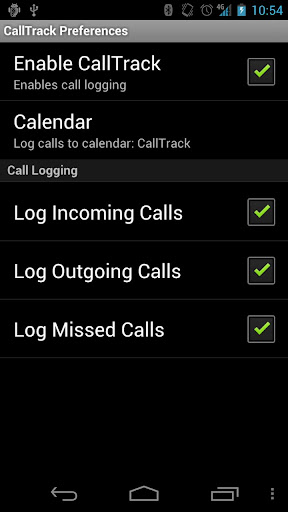
CallTrack syncs your phones call activity to your Google Calendar. You can select the type of calls to log (incoming, outgoing, and missed) and the calendar to log them in. You can also dump your current call log to your calendar.
Using this app in conjunction with the Google Calendar Sync for Outlook program, you could have access to your call logs inside Outlook to make it easier to schedule any calls that may need returned the next day. Having this call log in your calendar could also make it easier to remember who you helped through out the day to ensure you are able to account for any billable time to a client.
Check out CallTrack in the Google Play store
Source - Redmond Pie
CallTrack syncs your phones call activity to your Google Calendar. You can select the type of calls to log (incoming, outgoing, and missed) and the calendar to log them in. You can also dump your current call log to your calendar.
Using this app in conjunction with the Google Calendar Sync for Outlook program, you could have access to your call logs inside Outlook to make it easier to schedule any calls that may need returned the next day. Having this call log in your calendar could also make it easier to remember who you helped through out the day to ensure you are able to account for any billable time to a client.
Check out CallTrack in the Google Play store
Source - Redmond Pie
Monday, April 23, 2012
Mac Malware - More Threats
F-secure has a great article that goes over the new threats that have popped up recently and have been overshadowed by all of the Flashback news.
Included in this article is information on more malware exploiting Microsoft Office for Mac vulnerabilities going back to Mac Office 2005 & 2008 in combination with the Java vulnerability used in the Flashback malware. This new malware is called SabPub.
Please make sure you have the latest service packs installed by using the Microsoft Office updater application that was installed as part of the Office Suite itself.
Earlier in April, Microsoft released Service Pack 2 for Mac Office 2011 which takes the version number up to 14.2.0. This service pack not only fixes vulnerabilities, it fixes a large number of issues with Outlook that will result in a generally more stable connection with Exchange. But there have been a number of problems with this update and Microsoft has removed the update until it can resolve the problems and re-issue the update.
Included in this article is information on more malware exploiting Microsoft Office for Mac vulnerabilities going back to Mac Office 2005 & 2008 in combination with the Java vulnerability used in the Flashback malware. This new malware is called SabPub.
Please make sure you have the latest service packs installed by using the Microsoft Office updater application that was installed as part of the Office Suite itself.
Earlier in April, Microsoft released Service Pack 2 for Mac Office 2011 which takes the version number up to 14.2.0. This service pack not only fixes vulnerabilities, it fixes a large number of issues with Outlook that will result in a generally more stable connection with Exchange. But there have been a number of problems with this update and Microsoft has removed the update until it can resolve the problems and re-issue the update.
Thursday, April 19, 2012
Adobe Acrobat Reader marks major security update
Earlier in April, Adobe updated its free Adobe Reader product to version 10.1.3 and 9.5.1. While fixing multiple vulnerabilities, the major change to the newly updated 9.5.1 version is the removal of a bundled Flash Player library file. This library file has been the source of many vulnerabilities in Adobe Reader as the vulnerability patch cycle for Acrobat Reader and Flash are different. This can be seen with version 10.1.3 which actually incorporated three previous Flash Player security updates that had been pushed out over the past three months.
Adobe does plan to remove the bundled Flash Player from the Adobe Reader 10.x in the near future, but currently the security sandbox built into the 10.x versions does provide a better level or protection than the previous versions (9.5.1 and below) that did not include the sandbox.
These changes will not affect most users as the PDF files that they use daily do not contain any Flash interactive content. For those that do use those type of PDFs, the 9.5.1 version of Reader will utilize the standalone Flash Player plug-in (usually used for Firefox, Safari or Opera).
You can find more details on the specifics on this Adobe Blog Post.
I highly recommend all users update their Adobe Acrobat Reader by running the Adobe Update utility under the Help menu, or going directly to Adobe's website to download and install the latest version (10.1.3)
While the above information is primarily targeted at Windows users, Adobe did update the mac versions of Adobe reader as well. As this CNET article points out, even the smallest patch to a widely distributed program can protect your system from future infections since these updates resolve problems that could cause the application to crash and potentially allow an attacker to take control of the affected system.
Source: Computerworld
Adobe does plan to remove the bundled Flash Player from the Adobe Reader 10.x in the near future, but currently the security sandbox built into the 10.x versions does provide a better level or protection than the previous versions (9.5.1 and below) that did not include the sandbox.
These changes will not affect most users as the PDF files that they use daily do not contain any Flash interactive content. For those that do use those type of PDFs, the 9.5.1 version of Reader will utilize the standalone Flash Player plug-in (usually used for Firefox, Safari or Opera).
You can find more details on the specifics on this Adobe Blog Post.
I highly recommend all users update their Adobe Acrobat Reader by running the Adobe Update utility under the Help menu, or going directly to Adobe's website to download and install the latest version (10.1.3)
While the above information is primarily targeted at Windows users, Adobe did update the mac versions of Adobe reader as well. As this CNET article points out, even the smallest patch to a widely distributed program can protect your system from future infections since these updates resolve problems that could cause the application to crash and potentially allow an attacker to take control of the affected system.
Source: Computerworld
Subscribe to:
Posts (Atom)
